One sure sign of summer is the sight of the various Farmers Markets around town. I’m fortunate to be in close proximity to several during the week and check them out as often as I can. Last Saturday was no exception.
After getting rained out at an Indian’s game the night before I found a break in the clouds long enough to make it down to the Broad Ripple Farmers Market. This one is always well attended and has a great mix of vendors selling everything from bread to veggies to Hickory Syrup (good stuff).
Picked up some veggies for a Farro Salad I was making for a cookout later that evening & even bought some breakfast. All in all it’s worth the trip to the Village. If you can’t find what you want there’s a produce stand on Allisonville and another farmers market on Binford Ave.
After waking up to a cold house 3 mornings in a row and finding my programmable thermostat reset to its factory defaults I set out on a quest for a replacement. I’d seen the Nest Learning Thermostat before but always shied away because of the $250+ cost.
After reading a review of the new 2nd generation unit, and customer comments saying the 1st Generation was better (and now cheaper), I decided to take another look at the Nest.
Designed by former Apple employees the Nest is a remarkable device with a feature list almost too amazing to believe. At first glance a web enabled thermostat sounds like overkill but when you realize what that feature allows the device to do it become more interesting…
By connecting to the Internet the Nest can be controlled remotely via computer or smartphone. It also receives software updates and monitors the weather outside your home. This last feature allows the unit to learn the thermodynamic properties of the structure and estimate the amount of time it will take to reach a requested temperature.
Let’s say I program the thermostat to let the house be a little warmer when I’m at work. If it’s been programmed to have the house at 72-degrees at 5pm knowing the outside temperature and how log it’s going to take the AC to get to the requested temperature allows it to only run the AC as long as it needs to. So on a really hot day it might start the pre-cooling process at 3pm where a cooler day it might not start until 4:30pm.
HVAC cycles are recorded and you can view the heating/cooling cycles for previous days. There’s even monthly energy reports available. Since I’ve only had the unit for 10 days it’s still learning. Future blog posts will further detail the long-term usage of the Nest.
There’s a lot of chatter online about the Gen 1 vs. the Gen 2 versions of the Nest. The Gen 2 has a slightly different look to it and it’s designed to work with a greater variety of HAVC units. People who have “upgraded” to the new unit have a lot of complaints about how it does not seem to work as well as the Gen 1. The good thing is they both run the same software and have the same feature set. After verifying my HVAC system would work with the Gen 1 Nest I placed my order and saved about $75 in the process.
One feature that Immediately got my attention was the heat/cool mode. You pick the upper temperature you’re comfortable with as well as the lower temp. The Nest will heat or cool as necessary to stay within that range (no more manually changing modes). I have mine set for 66-74 degrees and that 8-degree range is enough to prevent my furnace or AC from running most of the day when the temps are in the 60’s-80’s.
The Auto-Fam mode allows me to cycle the fan at just about any schedule I want. Currently I run the fan for 15-minutes an hour to keep the inside air from becoming stale. I used to leave the fan running constantly to help even the temperature between floors.
A proximity sensor on the unit detects movement and after a few weeks it’s supposed to learn when you’re home or not. This allows you to set a broader temperature range. If your work/weekend schedule is pretty consistent this may be a good option for you. My schedule is not and I’m not sure how well this is going to work long-term. 10 days in and it’s still trying to “learn” my schedule. The display of the unit turns on when you approach it which is pretty cool.
Call me lazy but being able to adjust the Heat/AC from anywhere is pretty cool. Especially when you wake up one morning to a house a little cooler than you want. Pickup the smart phone, tap tap tap, the heat comes on and you’re toasty in minutes.
There’s a lot more to talk about but for now I’m going to leave you with this promo video that gives a good synopses of the Nest. Feel free to leave any questions in the comments section and I’ll do my best to answer them.
Being a homeowner for the past 15+ years I’ve had my share of do-it-yourself projects and a never-ending “Honey-do” list to tackle every weekend. For the most part a house is pretty easy to take care of as long as you stay ahead of problems before they manifest themselves into something bigger.
Recently I discovered a new (to me) kind of wall anchor and wanted to let everyone know about it. It’s called a Zip-It wall anchor. I’ve always hated getting out the drill and trying to make sure made the correct sized hole for the anchor I wanted to use. I usually drilled the wrong size hole and ended up having to hammer the anchor into the wall, often damaging it in the process.
New Style Push and Screw Anchor
The Zip-It anchors don’t require a drill and their unique auger design provides a secure grip in the wall. All you need to do is push the sharpened tip into the wall and use a phillips head screw driver to screw the anchor into the wall. Zip-It’s come in nylon as well as metal and a variety of sizes.
I’ve used these for the past 6 months and there’s no way I’ll ever go back to the old drill and plug method. Zip-It fasteners can be found at just about any hardware store.
I’ll admit I’m starting to get a case of Apple Fever. After moving to an iPhone from the long favored Blackberry and actually finding a way to integrate an iPad into my daily routine I’m taking the next step… I’ve purchased a MacBook Pro.
This is not just any MacBook, this is the 13″ model with the *new* retina display, 8GB of memory and a roomy 256GB Solid State Hard Drive. Having used a 12.1″ Lenovo Thinkpad for the past 4 years the 13″ display on the MacBook seems a lot larger and the resolution (and clarity) of the retina display is nothing short of amazing.
The overall design of the Apple MacBook Pro is very nice. Machined from a solid block of aluminum this thing is as solid as it gets. No plastic to flex or creak and no flimsy screen to move around. I’ve never felt a laptop as well-built as this is.
I mention Windows Functionality in the title of this post. That’s possible because of a virtualization application called Parallels which allow you to run Windows applications right alongside the Macintosh apps. It’s pretty much seamless and, so far, it just works.
I’m still in the “getting to know you” stages of the Macbook but I really like what I see so far. Time will tell if this becomes my primary platform or if the limitations push me back to the world of Windows. There are enough differences in how the two systems work that it’s going to take some time for the Apple Operating System to become second nature like Windows has become.
After I take this thing on an extended test drive I’ll go into more detail and post a more thorough review. Stay tuned…
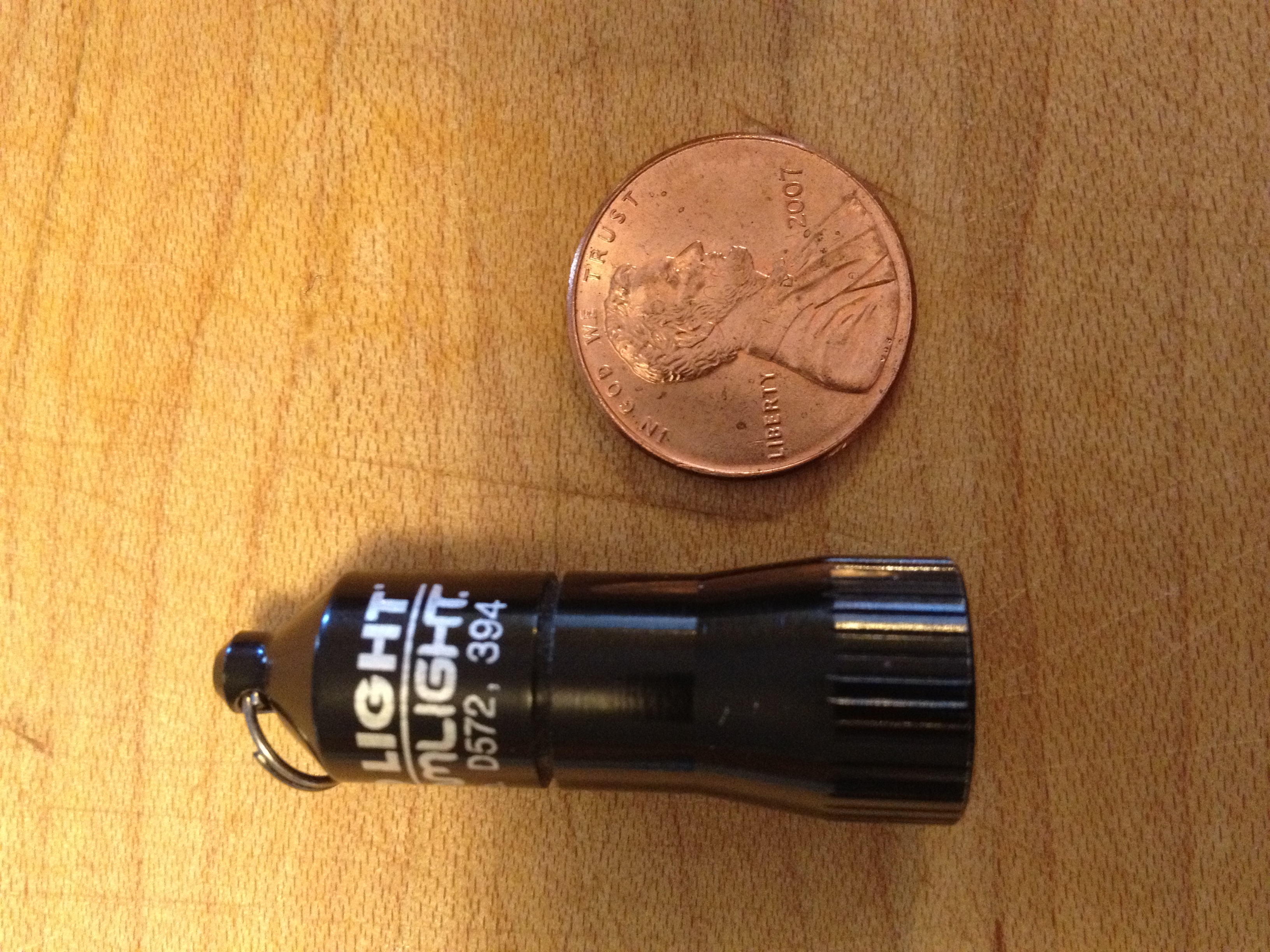
Light is something we all need. Whether naturally or artificially generated light is necessary for humans to discern distance, color and motion. For years I’ve carried some form of light or another, normally in the form of a small flashlight on my key chain.
My key chain light of choice for the past 10 years was a Photon light. Small, inexpensive and very durable the Photon has been useful in countless situations throughout the years. Recently while reading the Every Day Carry blog I stumbled upon a new light that I just had to try.
Machined aircraft-grade aluminum with anodized finish
Powered by 4 alkaline button cells (included)
100,000 hr. lifetime high-intensity LED
LED available in white (10 lumens)
1.47″ x .51″
.36 oz.
But I think the most impressive spec is the price! This light can be purchased for less than $10 on Amazon and it’s worth every penny.
Now 10 lumens does not seem like a lot of light, especially when compared to other lights like the $40 Quark Mini 123 which can pump out 180 lumens, but it’s perfect for everyday tasks like looking under a desk, or simple task lighting. I’ve used it for lighting up a dark hallway and changing the air filter on my car at night. The tiny size all but guarantees it’s going to be with me at all times.
Top – Surefire 6Z Middle – Quark MiNi 123 Bottom – Streamlight Nano
Operation is simple. Twist on, twist off. That’s all there is to it. No special functions or flashing patterns with this one. Compared to the Surefire 6Z and Quark Mini the Streamlight is practically non-existent.
The unit comes with button cell batteries (4 of them) as well as a split ring and spring-loaded clip. Once installed on a key chain it’s not even noticeable.
If you’re looking for an inexpensive key chain light that really performs I recommend you check out the Streamlight Nano. If you do, leave a comment below and let me know how you like it!
I posted back in 2011 about my all time favorite Every day Carry (EDC) item the Leatherman Micra. Well, I finally misplaced mine & thinking it would eventually show up I held off on buying a replacement. After a little more than a month I had to break down and buy another one.
Amazing how you become so accustomed to having something with you at all times and really missing it when you don’t. Ordered it from Amazon and had it in just a few days. SO glad I replaced it. I’m impressed that after over 15-years of these things being made the new one is EXACTLY like the old one. That’s pretty unusual these days when it seems like there are differences in products even after only a few months. Welcome back my old friend, I’ll be sure to keep a better eye on you then I did your sibling.
Had to call Apple customer support this week for a client who had some equipment stolen. I was VERY impressed with how they handled the call. VERY helpful and efficient. Good example for some of the others to follow (I’m talking to you HP, Cisco & Microsoft!!)…
Not often I have ANYTHING to positive to say about support so I thought I would at least pass it along.
I tried the “Super Shower Cleaner” this weekend but used Simple Green instead of dish detergent. Worked like a charm! I’ve used vinegar to clean tea kettles and glassware but I’ve never thought about using it on glass shower doors/walls.
One of the guys at work told me about the Dollar Shave Club a few weeks ago. After watching the funny website video I knew I had to give this a try.
Within 3 days of my order I received the following email:
Wow. We’re blushing.
Over the past week, you have validated more than 18 months of hard work & preparation. We are thrilled you think there’s a better way to shop for a shave, and we’re grateful for the opportunity to prove you right.
Safe to say, we weren’t expecting the demand we saw. After all, this was our label printer last week:
Well, I’m happy to report my order arrived today & everything looks pretty good. More updates after I try these razors out for a few days.
Wow. We’re blushing.
Over the past week, you have validated more than 18 months of hard work & preparation. We are thrilled you think there’s a better way to shop for a shave, and we’re grateful for the opportunity to prove you right.
Safe to say, we weren’t expecting the demand we saw. After all, this was our label printer last week:
This website uses cookies to improve your experience. We'll assume you're ok with this, but you can opt-out if you wish.AcceptRead More
Privacy & Cookies Policy
Privacy Overview
This website uses cookies to improve your experience while you navigate through the website. Out of these cookies, the cookies that are categorized as necessary are stored on your browser as they are essential for the working of basic functionalities of the website. We also use third-party cookies that help us analyze and understand how you use this website. These cookies will be stored in your browser only with your consent. You also have the option to opt-out of these cookies. But opting out of some of these cookies may have an effect on your browsing experience.
Necessary cookies are absolutely essential for the website to function properly. This category only includes cookies that ensures basic functionalities and security features of the website. These cookies do not store any personal information.