
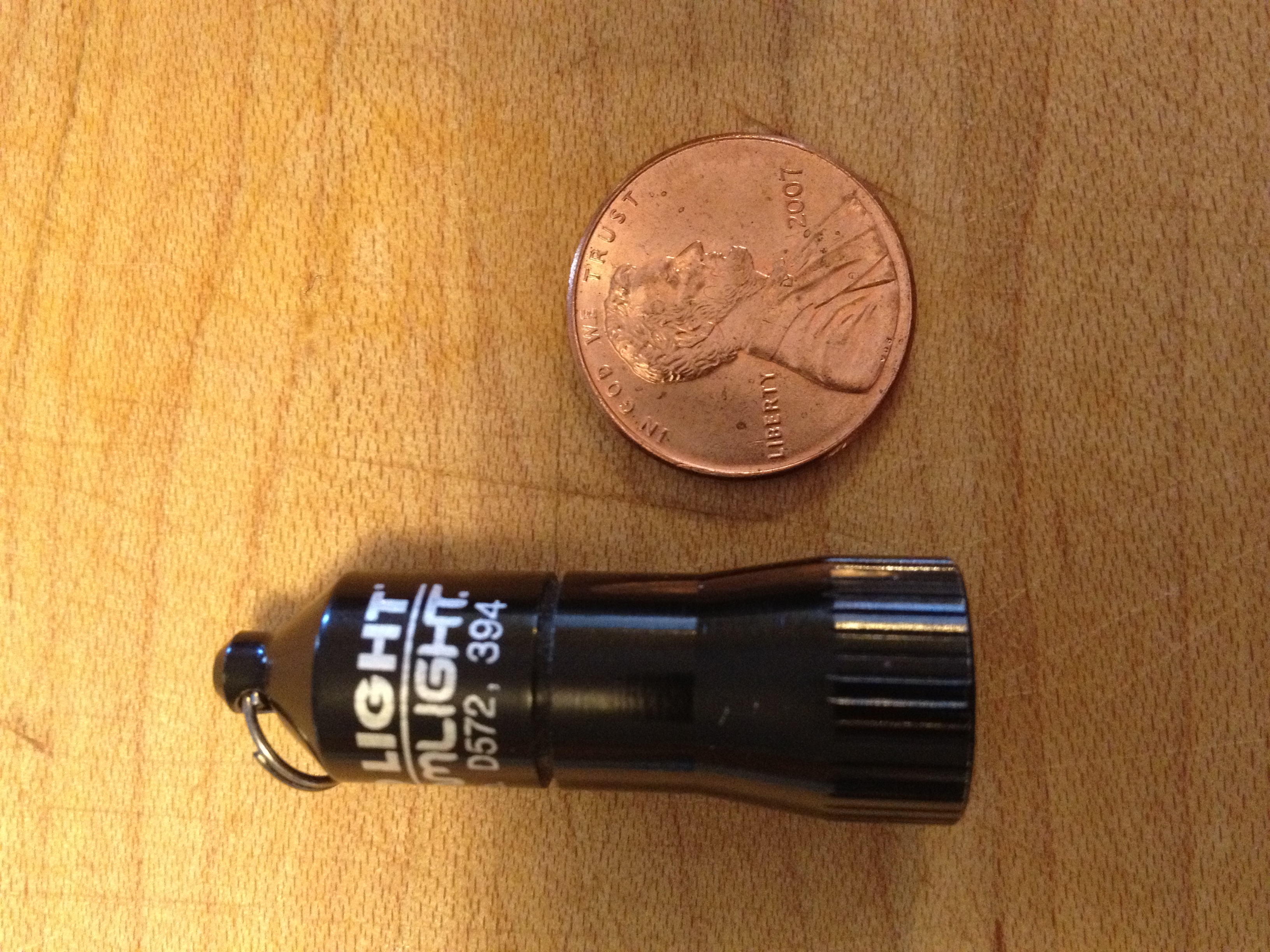
Need a Little Light?

Light is something we all need.  Whether naturally or artificially generated light is necessary for humans to discern distance, color and motion.  For years I’ve carried some form of light or another, normally in the form of a small flashlight on my key chain.

My key chain light of choice for the past 10 years was a Photon light.  Small, inexpensive and very durable the Photon has been useful in countless situations throughout the years.  Recently while reading the Every Day Carry blog I stumbled upon a new light that I just had to try.

The Streamlight Nano has some pretty impressive specs:

  • Up to 8 hrs. run time
  • Machined aircraft-grade aluminum with anodized finish
  • Powered by 4 alkaline button cells (included)
  • 100,000 hr. lifetime high-intensity LED
  • LED available in white (10 lumens)
  • 1.47″ x .51″
  • .36 oz.

But I think the most impressive spec is the price!  This light can be purchased for less than $10 on Amazon and it’s worth every penny.

Now 10 lumens does not seem like a lot of light, especially when compared to other lights like the $40 Quark Mini 123 which can pump out 180 lumens, but it’s perfect for everyday tasks like looking under a desk, or simple task lighting.  I’ve used it for lighting up a dark hallway and changing the air filter on my car at night.  The tiny size all but guarantees it’s going to be with me at all times.

Top – Surefire 6Z
Middle – Quark MiNi 123
Bottom – Streamlight Nano

Operation is simple.  Twist on, twist off.  That’s all there is to it.  No special functions or flashing patterns with this one.  Compared to the Surefire 6Z and Quark Mini the Streamlight is practically non-existent.

The unit comes with button cell batteries (4 of them) as well as a split ring and spring-loaded clip.  Once installed on a key chain it’s not even noticeable.

If you’re looking for an inexpensive key chain light that really performs I recommend you check out the Streamlight Nano.  If you do, leave a comment below and let me know how you like it!


Leatherman Micra Revisit

I posted back in 2011 about my all time favorite Every day Carry (EDC) item the Leatherman Micra.  Well, I finally misplaced mine & thinking it would eventually show up I held off on buying a replacement.  After a little more than a month I had to break down and buy another one.

Amazing how you become so accustomed to having something with you at all times and really missing it when you don’t.  Ordered it from Amazon and had it in just a few days.  SO glad I replaced it.  I’m impressed that after over 15-years of these things being made the new one is EXACTLY like the old one.  That’s pretty unusual these days when it seems like there are differences in products even after only a few months.  Welcome back my old friend, I’ll be sure to keep a better eye on you then I did your sibling.


Keeping the Web in Your Pocket

As much as I read online you would think I’d already be using an online clipboard but the usefulness was lost on me until about three weeks ago.  Pocket (formerly Read-it-Later) is changing the way I collect and process online content.

Adding a simple bookmark to your browser allows you to take the article you’re reading on the screen and transform it into a very readable (i.e. NO ADS!) format you can take with you anywhere.  Just launch the app on your phone and once downloaded you can get access to the information without any kind of network connection.

Tired of reading on the small screen?  Visit the Pocket website and read on your computer.  Pocket is cross-platform and integrated into a lot of applications (like Twitter for iPhone) where it will grab a link and process it for later reading.  Finally you can email any link to [email protected] and have it processed that way.

Definitely a great way to grab content for later consumption.  The only drawback I’ve found so far is I have a LOT more to read and it’s getting hard to keep caught up!

iPhone – Did I Make the Switch?

It’s been just shy of 3 weeks since I turned off the Blackberry and started testing the iPhone as a potential replacement.  In that time I’ve had the opportunity to install/uninstall software, test accessories, and perform an operating system update (all without issue or lost data).

Yesterday I wiped the Blackberry and turned it in (along with some ribbing from the guys at work).  I really didn’t think it would come to this but I’m going to admit it, I like the iPhone.

The iPhone is not perfect my any means (what piece of technology is?) but it’s preformed quite well during my testing phase.

While testing I made some mental notes along the way:

Pros:

  • Application Availability – If you can think of it there’s probably “an app for that”.
  • Build Quality – Solid with tight tolerances and attention to detail.
  • Screen Resolution – I can actually read PDF files now!
  • Overall Responsiveness – Very little delay between user input and system output.
  • Camera – Forget the Mega Pixel count, the optics are very impressive for a phone.
  • Audio Output – Loud and clear.
  • Messaging – iMessage, FaceTime & just about every Social App available.
  • Productivity – Full Exchange Compatibility (with the addition of a 3rd party application*)
  • Location Based Reminders – Arrive/leave a location and get reminded of something you need to do at that time (Example – Set the trash out every Wed when you get home from work).

Cons:

  • Battery Life – If you use the phone at all you’re going to have a hard time getting through the day on a single charge (I found a solution I’ll discuss below**).
  • On-screen Keyboard – I’m slowly getting used to it and the auto correct has not burned me (yet).
  • Data Network – I seem to lose 3G coverage more than I did with the Blackberry.
  • Software Limitations – Some Apps I could use (like a Wi-Fi scanner) are not approved for use by Apple Corp.  This is resolved by Jail Breaking, so I hear…
  • Siri – This has SO MUCH potential if it would just do more than basic functions.

* TaskTask a $4.99 app fixed the issue with Outlook Tasks not syncing with the iPhone.  This would have been a deal breaker for me if the app did not exist.  I live and die by my task list (Insert GTD fanboy laugh here).

** As discussed in a previous post the PhoneSuite Elite solved by battery issues.  I can use the iPhone all day without any worry of falling offline due to a low battery.

Some applications worth mentioning:

  • Remote Controls – I can now control Roku, iTunes, Media PC and the U-Verse DVR from the iPhone.
  • Games – Words with Friends is pretty addictive as are any of the EA Games titles.
  • Dragon Dictation – This app is built in and does an incredible job of turning spoken words into text.

So there you have it, yet another move to a new platform.  Let’s see, in the last 20+ years it’s been:

  • Pen & Paper
  • Casio Address Book
  • HP Palmtop
  • Motorola Pager
  • Motorola 2-Way Pager
  • Motorola Star-Tac
  • Palm (several models)
  • Windows Mobile (several models)
  • Blackberry (several models)
  • iPhone 4s

Who knows what the future will hold but it the past is any indication it’s going to keep getting better and better.


iPhone and Battery Life

This is part 2 of a series documenting my potential switch from a Blackberry 9930 to an iPhone 4s.  Part 1 can be found here.

After just a couple of days with the iPhone I’ve already noticed the battery life is nowhere near what I was getting with the Blackberry.  I know I’m playing around with it a lot but it’s also plugged into the laptop most of the time when I’m at my desk.

In the meantime I’ve ordered (and received) a case that has a built-in 21oo mAh battery.  The PhoneSuit Elite has enough juice to completely recharge a drained iPhone in approximately 2 hours.  It can also be used to keep the battery fully charged throughout the day.

The PhoneSuit adds a bit of bulk and weight (2.8 oz) to the phone (weighing 4.9 oz without the case) but that’s not a bad thing since I’ve come close to dropping the phone on more than one occasion (why is this damn thing so slippery?).  The case is easily removed should I need to slim things down and as an added plus it uses a micro USB cable for charging AND syncing.  That’s one less cable I need to keep track of in my gear bag.

I’ve had the PhoneSuit case for a few days now and I really like it.  I found lots of positive reviews online that made the decision to buy an easy one.  The case works as advertised and provides plenty of power to get me through the day leaving quite a bit of charge in reserve.  I could see getting 2 days of moderate usage without having to plug in for a recharge.

I also ordered a slim case for those times when I don’t need the extra battery capacity (or want the added weight).  If you’re looking for a phone case (or just about any accessory) don’t go retail, go eBay.  HUGE price difference and a lot of vendors offer free expedited shipping so you get your item in just a few days.  I ordered a case that retailed for $30 for only $2.99 on eBay.

I’m continuing to test the iPhone and upcoming posts will cover Applications, Siri, and Final Results of my testing.  Stay Tuned for more!

Can I Make The Switch?

Let me start off by saying I’m a BlackBerry fan(boy). I also like Apple. But I use a BlackBerry for my day-to-day tasks at work and personal stuff.  It’s been a great platform which has proven itself reliable, secure and fast.

Recently though with the latest software update I’ve had a lot of problems with my BlackBerry 9930. Frequent lockups, long reboots (15 minutes!), and poor battery life have led me to look for an alternative.

Earlier this week I received an iPhone 4s to try and so far it’s pretty interesting. Having used an iPod touch for years I’m very familiar with the Apple operating system. In fact an iPhone is just touch with a phone. (or so I thought).

I know there’s a bit more to it like processing power, battery life, screen resolution, and Siri, but other than that they’re very similar (ha).

The first thing I noticed when using the iPhone is its much faster than my fourth generation iPod touch. I mean it’s really fast!  It makes the applications that I’m used to much more enjoyable. They seem to launch faster, respond faster, and all-around give a better user experience.

I’m giving the iPhone two weeks to see if it can win me over. If not, I’m going to have to (shutter) look at an Android or go back to a Windows-based phone…  I surely hope the ghost of Steve will prevent that from happening.

Black Rapid RS-7 Camera Sling

I was walking around downtown Indy on St. Patrick’s Day looking for interesting things to photograph.  I had my new setup of the Nikon D2X and a 24-85mm zoom lens.  I also had my 50mm in the pocket of my cargo shorts in case I needed an indoor lens.  After about 2 hours of walking around the added weight of the D2X was becoming quite noticeable (using the factory strap).

I remembered Roberts Camera had a location just south of the circle and decided to pop in to see if they had any replacement straps in stock.  I’ve seen a lot of reviews lately about the Black Rapid line of camera straps and decided it was time to check one out.

$60 is a lot of money to pay for a camera strap but the unique design of the RS-7 and the increased comfort make it worth every penny.  Here’s a video from Jared Polin (Fro Knows Photo) showing how the Black Rapid system works

Review – Fitbit Ultra

My day can be pretty active at times and after the end of one of those days it’s always nice to see what you’ve done physically (mentally is an all together different issue).  If you’ve ever used a pedometer to measure your daily activity I’m sure you’ve wished it could do more than count your steps.

Enter the FitBit.  This little piece of technology can do some pretty amazing things. Now in its 2nd generation (FitBit Ultra) the unit has worked out the quirks of the 1st generation unit and added some cool new features.  I’ve been following this product since I first heard about it 4 years ago (before it was completed and on the market)

The FitBit Ultra is a tiny, lightweight (0.4 oz), device that you wear on your body during the day to measure activity and at night to measure the lack of activity (sleep).  It’s so light you can easily forget you have it with you.

The FitBit Ultra measures the following activities:

  • Steps taken
  • Distance traveled
  • Calories burned (based on activity, height, weight)
  • Floors climbed (1 floor for every 10′ in elevation change while walking)
  • Overall progress towards the activity goals you have established online

One of the many cool features of the FitBit is that it will auto-sync with the web-based dashboard when you are in the same room as the receiver (which is plugged into a computer).  I have my receiver plugged into the home theater PC since I’m usually in that room once a day.  The receiver also functions as a charging stand, something you will need to do every 5-7 days.

Once your data is uploaded the website compiles all of the information into an easy to understand dashboard.  This dashboard shows historical data as well as averages and goals you have set up (loose 5 pounds, walk 10,000 steps a day, climb 10 flights of stairs a day, etc.).  The dashboard is also where you can enter in the food you’ve eaten to do some calorie calculations (calories consumed vs. burned).  There is a premium, subscription based, dashboard that has additional features like a trainer, more detailed analysis of your activities and food intake.

One FitBit feature that I specifically wanted to try was the sleep analyzer function.  I’ve always assumed I was getting a good nights sleep but never knew how to tell.  By clipping the FitBit on your shirt sleeve (or using the included wrist band) the device measures how many times you “wake up” during the night.

Last night I woke up (moved) 5 times during my 7-hour slumber and that worked out to an efficiency rating of 99%.  I guess I slept good last night!  I just bought the unit last weekend and I’m still getting used to everything I can do with it.

If you’re into mobile apps (and who isn’t these days?) you can access your dashboard with an iPhone, Blackberry, and Android device.

For $99 the FitBit Ultra is an interesting toy that I’m going to plan on using for the foreseeable future to measure my activity level.  Having something like this is a huge motivator and has already convinced me to take the stairs vs. the elevator today (and in the days to come).

Here’s the promotional video that does a great job explaining how the FitBit can “fit” into your lifestyle.


Daily Carry – Quark MiNi 123 Flashlight

4Sevens Quark MiniX 123

Every once in a while a product exceeds my expectations so much I have to tell the world about it.  This is the case with my latest Every Day Carry (EDC) item the “4Sevens Quark Mini 123” flashlight ($39 retail price).

Not only is this one of the smallest flashlights I have ever used it far surpasses my old standby the Surefire 6Z that I reviewed back in January 2009.  I first learned about the Quark Mini 123 while looking around on the Every Day Carry site.

The EDC site is a place for people to submit photographs of the items they carry with them every day (tactical and otherwise).  A common theme of these user submitted photos was the Quark Mini 123.

With my curiosity piqued I did some searching on the web and found several reviews on YouTube, all of which were very favorable regarding this flashlight.  That was enough for me to order one to see for myself.

123 Size Lithium Battery

I’ve included the specifications of this flashlight at the end of this review but here’s one spec you need to know.  This little light can produce 180 Lumens of light, and it only uses a single 123 sized lithium battery!  The Surefire with LED head produces 80 Lumens (and uses two 123 batteries) and I thought that was bright enough!

How bright is 180 Lumens?  Remember those AA MagLights we all had at one point or another (or still have)?  That light produces 15.2 average Lumens and a run time of 5.5 hours on alkaline batteries.  A three D cell MagLight model produces on average 76.8 Lumens with a run time of about 9 hours.

Something to note about the above comparison is that the MagLights are using incandescent light bulbs (filament inside of a vacuum).  Most “modern” flashlights are now using LED bulbs that produce an incredible amount of light given their size and power input.  I upgraded the Surefire to an LED head to get the 80 Lumens of output (it produced 65 with its incandescent bulb from the factory)

Size Comparison (AA & 123 batteries)

LED bulbs also generate a lot of heat to prolonged use can cause the light to get a little warm (hot in the case of the Surefire 6Z)  LED bulbs are not easily replaceable in the field either.  The good thing is they last a lot longer than incandescent bulbs.

To activate the Quark MiNi 123, tighten the bezel clockwise. The light will turn on when the bezel is fully tightened, and turn off when the bezel is loosened.  Turning the light on/off quickly will activate the 3 output settings (Low/Med/High).  Cycle through the output settings twice (within about 5 seconds) and you will activate the “special” settings (Strobe, SOS, High/Low Beacon).

I can’t say enough about this little light.  It’s about the size of an average thumb and easily fits in any pocket.  The included lanyard is a good way to keep track of the light because it’s easily misplaced.

I still keep my Surefire in my EDC bag but the Quark Mini 123 is my preferred light just about every time.

4Sevens Q Mini X 123 Specifications (from the 4Sevens.com site):

  •     LED: CREE XP-G R5
  •     Max Output: 180 Out-the-front (OTF) lumens
  •     Material: Type-III Hard-anodized Aircraft-grade Aluminum
  •     Lens: Optical-grade glass lens with anti-reflective coating on both sides
  •     Reflector: Light orange-peel textured
  •     Water resistance: IPX-8
  •     Battery: One lithium CR123A (3V) – do not use rechargeable RCR123As

  Seven Output Modes:

  •         Low: 3 OTF lumens, 150 hours
  •         Medium: 40 OTF lumens, 8 hours
  •         High: 180 OTF lumens, 1.2 hours
  •         Special (hidden) modes:
  •         Strobe 2.4 hours
  •         SOS 7.2 hours
  •         Beacon (Hi) 12 hours
  •         Beacon (Lo) 60 hours

Dimensions:

  •         Length: 2.3 inches
  •         Diameter: 0.80 inches
  •         Weight: 0.62 ounces (w/o battery)

Included accessories: Lanyard, split ring for keychain attachment, spare o-ring.