After using the iPhone for a while I’ve become quite fond of it but with any device there tends to be a few quirks. Case in point; the iPhone alarm clock…
The Apple iOS starts just about all phone interactions with a swipe of the finger. That swipe becomes second nature to a lot of us because we’re unconsciously swiping to unlock our phones all day long.
So guess what happens when your alarm is going off at 6 am and you grab your phone to silence it (in my case hit snooze a few times)? That instinctive swipe motion turns the alarm OFF! You have to press a small red button titled “Snooze” to silence he phone for nine minutes. I’ve lost count how many times I’ve accidentally disabled my iPhone alarm in the morning. I think I’m finally getting the hang of it though…
Who came up with the nine minute snooze threshold anyway? Three of the four alarm clocks I’ve ever owned all had the nine minute snooze. The fourth one had a seven min snooze. I want a 10 minute snooze so I can easily calculate how many times I can hit it before I REALY need to get out of bed…
I spend a lot of time in my car and I’m always listening to something on the radio or the iPhone. Since I bought my Toyota I’ve been using the AUX-IN jack to connect my phone (for iTunes, Pandora, etc.) to the JBL Sound System. I was starting to pickup static and noise on my 3rd audio cable so I thought I’d look for a wireless alternative.
After shopping around online and only finding “hand free” units that will accept music but also act as a bluetooth speakerphone I was getting a little discouraged. I already have Bluetooth phone capabilities built into the car and I rarely ever use it. It’s fine for around town but at highway speeds it does not work well due to road/wind noise.
This tiny matchbook sized piece if plastic does one thing (stream Audio) and so far I’m really impressed with the performance. After pairing with the iPhone and plugging the little 3-inch pigtail into the AUX-IN port I had the music from my phone wirelessly transferred to the car stereo.
Features:
Bluetooth v2.1 + EDR
Transmits up to 33 feet away
Remembers up to six paired devices
Works with any phone or device capable of transmitting the Bluetooth stereo (A2DP) protocol
Up to 12 hours playback using internal Lithium-ion battery
Limited 1 Year Warranty
The Bluetooth connection sounds just as good as the wired connection and the phone automatically connects itself when I get into the car. I do have some concerns about how well the pigtail will hold up if I were to unplug/plug it in a few times (which I don’t plan on doing). There’s also the need for the unit to be charged every 10-12 hours of use. It comes with a USB cable that plugs into a small, round, power input socket on the side of the unit. When the unit is charging there is a detectable hiss from the charging circuit. It’s the same hiss I get when I charge the iPhone in the car while hardwired into the stereo, so I’m used to that.
I’m going to hold off for a while before passing judgement on the daily usability part until I can get a few weeks of use behind me. I’ll post an update here if any show stoppers come up but so far this looks like a good alternative to using an audio cable between the phone and stereo.
I’ll admit I’m starting to get a case of Apple Fever. After moving to an iPhone from the long favored Blackberry and actually finding a way to integrate an iPad into my daily routine I’m taking the next step… I’ve purchased a MacBook Pro.
This is not just any MacBook, this is the 13″ model with the *new* retina display, 8GB of memory and a roomy 256GB Solid State Hard Drive. Having used a 12.1″ Lenovo Thinkpad for the past 4 years the 13″ display on the MacBook seems a lot larger and the resolution (and clarity) of the retina display is nothing short of amazing.
The overall design of the Apple MacBook Pro is very nice. Machined from a solid block of aluminum this thing is as solid as it gets. No plastic to flex or creak and no flimsy screen to move around. I’ve never felt a laptop as well-built as this is.
I mention Windows Functionality in the title of this post. That’s possible because of a virtualization application called Parallels which allow you to run Windows applications right alongside the Macintosh apps. It’s pretty much seamless and, so far, it just works.
I’m still in the “getting to know you” stages of the Macbook but I really like what I see so far. Time will tell if this becomes my primary platform or if the limitations push me back to the world of Windows. There are enough differences in how the two systems work that it’s going to take some time for the Apple Operating System to become second nature like Windows has become.
After I take this thing on an extended test drive I’ll go into more detail and post a more thorough review. Stay tuned…
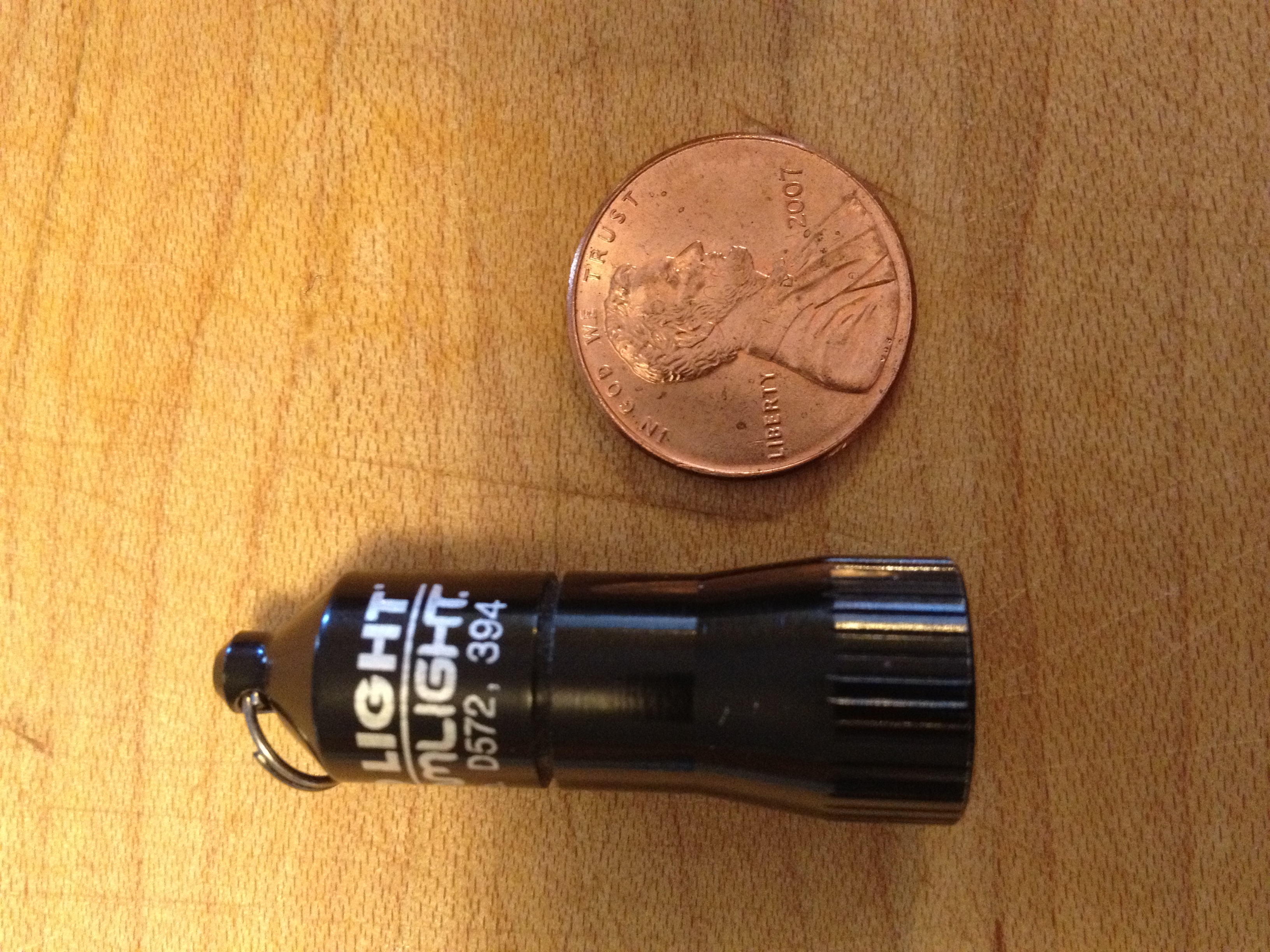
Light is something we all need. Whether naturally or artificially generated light is necessary for humans to discern distance, color and motion. For years I’ve carried some form of light or another, normally in the form of a small flashlight on my key chain.
My key chain light of choice for the past 10 years was a Photon light. Small, inexpensive and very durable the Photon has been useful in countless situations throughout the years. Recently while reading the Every Day Carry blog I stumbled upon a new light that I just had to try.
Machined aircraft-grade aluminum with anodized finish
Powered by 4 alkaline button cells (included)
100,000 hr. lifetime high-intensity LED
LED available in white (10 lumens)
1.47″ x .51″
.36 oz.
But I think the most impressive spec is the price! This light can be purchased for less than $10 on Amazon and it’s worth every penny.
Now 10 lumens does not seem like a lot of light, especially when compared to other lights like the $40 Quark Mini 123 which can pump out 180 lumens, but it’s perfect for everyday tasks like looking under a desk, or simple task lighting. I’ve used it for lighting up a dark hallway and changing the air filter on my car at night. The tiny size all but guarantees it’s going to be with me at all times.
Top – Surefire 6Z Middle – Quark MiNi 123 Bottom – Streamlight Nano
Operation is simple. Twist on, twist off. That’s all there is to it. No special functions or flashing patterns with this one. Compared to the Surefire 6Z and Quark Mini the Streamlight is practically non-existent.
The unit comes with button cell batteries (4 of them) as well as a split ring and spring-loaded clip. Once installed on a key chain it’s not even noticeable.
If you’re looking for an inexpensive key chain light that really performs I recommend you check out the Streamlight Nano. If you do, leave a comment below and let me know how you like it!
Remember the old-fashioned Scavenger Hunt? That party game that had the tendency to bring groups together via teamwork as well as cause some trouble as your team did “whatever it took” to win…
A newer, and in my opinion much more fun, version of that game is called Geocaching. If you have a GPS unit (or just about any kind of Smartphone) you too can play the Geocaching “game”.
Geocaching is similar to the 150-year-old game letterboxing, which uses clues and references to landmarks embedded in stories. Geocaching was conceived shortly after the removal of Selective Availability from GPS on May 2, 2000, because the improved accuracy[6] of the system allowed for a small container to be specifically placed and located. The first documented placement of a GPS-located cache took place on May 3, 2000, by Dave Ulmer of Beavercreek, Oregon.[7] The location was posted on the Usenetnewsgroup[8][9] as 45°17.460′N 122°24.800′W. By May 6, 2000, it had been found twice and logged once (by Mike Teague of Vancouver, Washington). According to Dave Ulmer’s message, the original stash was a black plastic bucket buried most of the way in the ground and contained software, videos, books, food, money, and a slingshot.[9]
I’m glad I read the Wikipedia piece because I totally forgot about Selective Availability that used to keep GPS units from being very accurate. The day the US Govt. turned it off is the day GPS became a usable tool for the everyday person.
To get started with geocaching all you need to do is go to geocaching.com and search for caches around your area. I’ll bet there are a few within 1-2 miles of your location (if not right down the street from you). Here’s a search of the Indianapolis area:
Every one of those little squares represents a geocache. As of today there are 1,817,076 active geocaches and over 5 million geocachers worldwide. This is a popular hobby & one that uses online technology to be successful.
As with any “game” there are rules and variations on the game. The rules for geocaching are pretty simple and it’s very easy to get started. This 2-minute video explains the basics:
So what does a geocache look like? Here’s an example of one my son & I found near the Monon Trail in Broad Ripple:
The coordinates got us to this spot and the compass indicated the geocache was about 50′ in front of us.We followed the path into the woods and something caught our attention right away…As we got a little closer we saw it. Do you see it?This is the cache that was in the plastic tube under the tree. What’s inside?Success! We found a cache with a lot of little goodies inside (they are not all like this). After signing the log book we took an item and left an item we had brought along with us.
As you can imagine this is a lot of fun for kids (young and old). It’s a great way to spend the afternoon outdoors and in a lot of cases you get to take part in a bit of nature along the way. Geocaching can be done on foot, with bicycles, or by car. We prefer to drive to a general location and set out on foot or on the bikes.
As I found out today it pays to become a paid member of the Geocaching.com website. You get access to “member only” caches that make the game even more exciting. You also get email alerts and better search tools to find caches that meet your preferred criteria.
If you’re looking for a great family activity that everyone can get involved in check out geocaching. It’s popular for a reason and once you find a few you’ll understand why!
Had to call Apple customer support this week for a client who had some equipment stolen. I was VERY impressed with how they handled the call. VERY helpful and efficient. Good example for some of the others to follow (I’m talking to you HP, Cisco & Microsoft!!)…
Not often I have ANYTHING to positive to say about support so I thought I would at least pass it along.
As much as I read online you would think I’d already be using an online clipboard but the usefulness was lost on me until about three weeks ago. Pocket (formerly Read-it-Later) is changing the way I collect and process online content.
Adding a simple bookmark to your browser allows you to take the article you’re reading on the screen and transform it into a very readable (i.e. NO ADS!) format you can take with you anywhere. Just launch the app on your phone and once downloaded you can get access to the information without any kind of network connection.
Tired of reading on the small screen? Visit the Pocket website and read on your computer. Pocket is cross-platform and integrated into a lot of applications (like Twitter for iPhone) where it will grab a link and process it for later reading. Finally you can email any link to [email protected] and have it processed that way.
Definitely a great way to grab content for later consumption. The only drawback I’ve found so far is I have a LOT more to read and it’s getting hard to keep caught up!
Google put together an entertaining animation showing what happens when you click the “Send” button in your email application. The Story of Send explains the various steps an electronic message goes through to get to its intended recipient. It’s actually pretty amazing that we can send a message anywhere in the world in a mater of seconds.
Google’s also trying to show you what a “Green” company they’ve become. In actuality being “Green” can save a company a lot of money in operating costs so it’s kind of win-win for business and the environment. Just about every large company on the planet is looking for ways to decrease operating costs and if it happens to have a positive environmental impact that’s just free PR they can spread about.
I’m still waiting for someone to figure out how to efficiently extract Hydrogen from water and capture the remaining Oxygen (which could also be used as fuel). Seems like a pretty good (clean) way to produce energy to me!
This website uses cookies to improve your experience. We'll assume you're ok with this, but you can opt-out if you wish.AcceptRead More
Privacy & Cookies Policy
Privacy Overview
This website uses cookies to improve your experience while you navigate through the website. Out of these cookies, the cookies that are categorized as necessary are stored on your browser as they are essential for the working of basic functionalities of the website. We also use third-party cookies that help us analyze and understand how you use this website. These cookies will be stored in your browser only with your consent. You also have the option to opt-out of these cookies. But opting out of some of these cookies may have an effect on your browsing experience.
Necessary cookies are absolutely essential for the website to function properly. This category only includes cookies that ensures basic functionalities and security features of the website. These cookies do not store any personal information.


 After using the iPhone for a while I’ve become quite fond of it but with any device there tends to be a few quirks. Case in point; the iPhone alarm clock…