
Long Term Report – Blackberry 9930

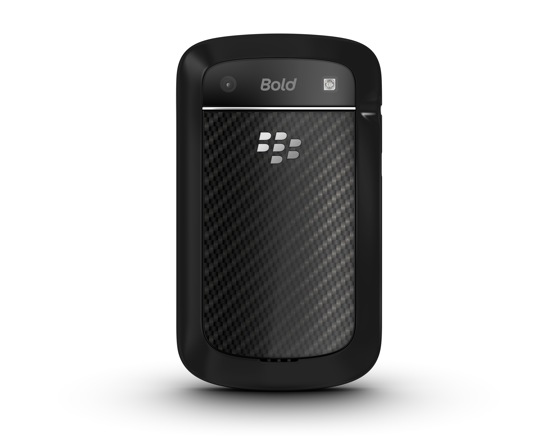
Last month I posted my initial review of the Blackberry Bold 9930 and, at the end of the review, I promised a follow-up post once I had some mileage on the unit.  Well, after one month I think I have a pretty good handle on the pros and cons of Blackberry’s latest release.

Research in Motion (RIM) continues to slip in the industry and that’s a shame because, in my opinion,  they do make quality products and they work well, especially in the enterprise market.  The Blackberry Enterprise Server (BES) gives administrators the utmost control of their mobile fleet although I venture to guess very few take advantage of the power BES can offer.

I’m not an Apple/Droid/WinMo hater.  I think they all make solid products and their phones are selling like crazy so, if anything, their marketing dollars are being well spent.  Just like automobiles, we all have our preferences and needs.  I welcome the competition as it keeps the smart phone market fresh with new innovations released monthly.

The following are my impressions after a month with the Blackberry Bold 9930.

Spoiler alert…  I still love the phone but it’s not perfect.

The touch screen is responsive and works very well but I don’t find myself using it all that often. Maybe it’s the fingerprints on the screen or the fact I can do everything I need to do with the keyboard or the touch pad.  I have had an issue with my favorite shopping app, Our Groceries, randomly adding, deleting list items if I don’t lock the unit before placing it in my pocket.  I’m chalking this up to an application that has not been updated to version 7 of the Blackberry operating system.

When I need to reboot the phone, which is not very often, it boots quickly (less than a minute).  This is a HUGE difference from past units that could take 3-4 minutes to restart.

The battery life is acceptable and it gets me through an 8-10 hour work day.   It’s typically down to about 30% when I go to bed.  This is similar to what I was getting with my past two Blackberry phones (8530 & 8330) and the Windows Mobile phone before that.  I don’t know to many people who can get more than a day out of their smart phone these days unless they are just not using it.

They keyboard continues to shine for long emails or note taking sessions.  My only gripe, and it’s a small one, is that it’s a little “poppy” sounding.  I’m thinking it’s the membrane under the keys.  I’m curious to see if it gets quieter with age (or I just get used to it).

As far as build quality the Blackberry Bold 9930 is solid.  Everything fits nicely and the seams are tight.  I had a raised piece of trim near the keyboard out of the box but it’s stayed in place once I pressed it down a few times.  The touch screen and “glass” fiber back are fingerprint magnets but without a screen protector of any kind I can’t find a single scratch on the unit.  I was hoping the front screen would use the “Gorilla Glass” that’s showing up on more and more smart phones units but whatever RIM is using seems to work.

Overall I’ll have to say I’m really happy with the Blackberry Bold 9930.  It’s has some really nice features, solid build quality, and a powerful processor that keeps up with everything I ask it to do.

One nice thing about my job is I don’t have to pay Verizon $250 to own one (which I might if I had to)!

Has DRS & KERS Saved Formula 1?

I’m a guy & most guys like racing of some form or another.  I used to be fascinated with Indy Cars & then started following NASCAR.  My latest obsession is Formula One (F1).  I used to watch F1 years ago but it got to the point where unless the Pole Position driver crashed he normally won the race.  This was because of the crazy technology like active suspension and anti-lock breaks (common in passenger cars these days)…  There was little to no passing…
There’s a bit of this going on now in F1 (Sebastian Vettel seems to win all the time) but the introduction of the Drag Reduction System (DRS) has brought passing back to F1.  In a nutshell DRS allows a driver who is less than 1 second behind another driver to open their rear wing and take advantage of an immediate reduction in drag thus making the car faster & allowing for the potential for a pass.  It can only be activated in certain areas of the track and even disabled by race control should the weather make it unsafe to use (F1 races in the rain which is VERY exciting to watch).

This, along with the Kinetic Energy Recovery Systems (KERS) has made F1 a lot more enjoyable to watch.  I actually look forward to each race and love watching these new technologies in use during the race.

Now we just have to get F1 back to the US

Hands On – Blackberry Bold 9930

Having practically grown up with technology (my first computer was an Apple IIc in the mid-80’s) I always get excited when I hear about new or updated products.  The mobile phone market, especially the “smart” phone, has exploded over the past few years and manufacturers are pumping out new makes and models at an astounding pace.

Once at the top of the mountain Research in Motion (RIM) has had it’s share of setbacks mainly from the folks at Apple who have found a way to brainwash people into thinking the iPhone is the only phone to have.  I don’t want to turn this into a manufacturer bashing as I feel the company’s at the top of the pile are there on their own merits.  I just feel like a physical keyboard makes the Blackberry feel more like a tool than a toy…  I do, however, love my iPod Touch and use it for all things media (and gaming).

Where was I?…   Oh yeah, Blackberry!  After a long, and painful to watch, slide out global dominance the brainiac at RIM have a new line of phones rolling out to phone vendors all over the USA.  Will these new models help prop up the best thing to come out of the Great White North since Bob and Doug McKenzie and the Kids in the Hall?  Let’s find out…

First of all, I have to say the expanded keyboard of the 9930 is unreal.  It’s slightly wider than past 9000 series phones and a better fit for my hands than the Bold 9650 that I just retired.  Key travel & tactile feedback are exactly as they should be (present but not over done) & I see myself typing longer emails and blog posts with it.

This is the first Blackberry with a full time QWERTY keyboard and a touch screen (if you don’t count the Torch “slider” model).  Having used something similar in a last life (i.e. Palm Treo 700x) the idea of keyboard and touch screen is not new.  What is new is having the ability to use a track pad, and multi-touch screen that negates the need for a stylus (remember those?).

The Blackberry Bold 9930 is also the thinnest and lightest unit ever made by RIM.  The metal wrapped sides is slightly reminiscent of the latest generation iPhone.  RIM choose to locate the antenna on the bottom edge of the unit to avoid the dreaded death grip that had been an issue with past smartphone models.

Rounding out all of this Fan Boy praise I need to mention the lightning quick processor speed, OS7, built in compass and the HD video recording capabilities.

So, is there anything wrong with the 9930?  In a word, yes.  It’s nothing earth shattering and most of it will probably be fixed over time but this phone is not perfect.

One of my first complaints is the reduction of convenience keys to a single button placed awkwardly on the lower right side.  These keys on past units could be programmed for many functions including application launch and voice commands.  Third party tools extended this capability to allow for multiple functions dictated by the number of sequential presses.  One press for the camera, two presses for the calendar, etc.

The 5MP camera has whats called “Extended Depth of Field” and is fixed focus.  It’s not a show stopper but your pictures will definitely look a lot different with everything in front and back of the subject in focus.

The 9930 is the first Blackberry to incorporate Near Field communications (NFC).  It’s a newer technology that has a lot of potential for simplified transactions, data exchange, and connections with a touch of the phone to a special device or tag.  This is all great but Verizon has chosen to DISABLE this feature.  This reminds me of the days where they would disable Bluetooth on phones.  The good news is the NFC hardware is there and leaked OS upgrades appear to enable the feature so all is not lost.  The adoption of NFC is also still in its infancy so I’m not missing much.

Lastly, there are the non-working apps.  OS7 requires some modifications on the part of the developers and as of today about 15% of my installed applications are not functioning properly.  I’m hoping this is a short-term problem & anxiously await to get Pandora working again!  (ha ha).

Specs and pricing for the Blackberry Bold 9930 can be found here.  It’s also available on other carriers under the Bold 9900 model number (same phone, different carrier radio type).

I’ll plan on posting a follow-up in a few months after I get some 9930 time under by belt.  If it’s anything like the first 48-hours I think I’ll be back here singing it’s praises.


The Digital Pen That Delivers

I was in a meeting a few months ago and one of the vendors had an unusual looking pen. I quickly did a Google search and discovered the pen was called a “LiveScribe” pen and it has quite a loyal following.  The pen digitizes your handwriting, records meeting audio and a whole lot more.  After some online research and the discovery of a great deal on eBay I had one to try for myself.

The first thing I noticed once I unpacked the pen is its size.  I’m used to full sized pens with the daily use of my Dunhill Sidecar but this one was just a little bit chunkier (and all plastic).  The weight is well balanced and it’s pretty easy to get used to the feel of the pen.

The “secret” to the LiveScribe system is a special Moleskine like notebook with micro-dot paper and a pen with a infra-red camera in the tip. Navigation “buttons” at the bottom of each page control various functions of the pen.

If you don’t want to use the Moleskine type notebooks you can print your own pages if you have access to a 600 dpi color printer.  Other notebooks are available in various form factors.

After you turn on the pen (important) and take notes, you plug the pen into your computer and the software downloads a copy of your notebook.  The mico-dots tell the application what notebook and page the notes were written on.  You can have up to 8 notebooks in the system (200 pages each) before you have to start archiving data.  It’s pretty impressive how well this all works.  Individual pages from multiple notebooks can be grouped together into a virtual notebook within the software.  All pages can be printed for more flexibility.  Being left handed I found the spiral bound started notebook to be a little difficult to use but the Moleskine type books are working great.

The latest software upgrade allows you to draw a double line anywhere on the page and write “email”, “Facebook”, or “Evernote” and once you sync the pen your notes will perform that pre-defined action, such as email a copy of your notes as a PDF.

A built-in audio recording function allows you to record meetings and directly tie the recording timeline to your notes.  After the meeting you can tap any word in your notes and the recording will start playing what was recording when you were writing that particular word.  I have played with this feature a few times but very few of the meetings I attend really need to be recorded.  I did use it for a 2-hour vendor seminar and it worked perfectly.  The 4GB model will record up to 400 hours of audio.

Livescribe offers various applications such as foreign language translations and games such as hangman.  One of the most used features, besides the pen, is the calculator.  Inside the notebook covers (front and back) are calculator “buttons” that you can tap on at any time to perform just about any calculation.  If you need to perform scientific calculations an optional app and calculator card can be purchased for around $6.

For those of you that use Evernote, all of your notes can be synchronized with the online service.  An optional OCR application can even turn your handwritten notes into editable text!

This pen has a lot of powerful functions built into a small package.  The development of applications is a little slow but the apps that are available are solid and work as advertised.

The biggest thing you have to get used to is turning the pen on each time you use it.  If you don’t turn it on the pen will not capture your notes electronically & it works just like a (dumb) pen.

The Livescribe system, which includes the pen and a starter notebook is priced as follows:

  • 4GB Model $149.99**
  • 8GB Model $199.99
  • Journals vary in price from $9.99-19.99

**I was able to find my 4GB model on eBay for about 1/2 price.

It remains to be seen if the Livescribe pen is a toy or a productivity tool.  For now I’ll have to say the concept is working quite well and I have been happy with the purchase.

Mobile Blogging – SO Close!

Since the beginning of this blog I’ve been looking for ways to use technology to write more. I don’t always have the laptop with me but my Blackberry never leaves my site.  What else do you need, right?  well, it’s not that easy…

The folks at WordPress have released the latest version of their mobile application and it seems to resolve some of the issues I was encountering when attempting to update the Blog when on the move.  While the Blackberry app is functional I’m finding the iPhone (iPod touch in my case) is a little more streamlined for quick blogging on the go.  I just can’t quite get used to the virtual keyboard on the IOS devices…

With either mobile platform the addition of graphics to the post is more difficult and, unless you remember all of the HTML tags, formatting can be a little tricky.  There are ways to publish via email, and that might be worth pursuing more.

In the end, nothing really beats sitting down with the laptop and being able to visualize the blogging process.  I find myself using the mobile devices to capture blog post ideas and subjects and finishing/publishing the post from the laptop.  Perhaps that’s where I need to concentrate my efforts…

Hey Bloggers, what tools are you using?  I’m especially interested in hearing from the local food bloggers.  Are you writing your reviews while mobile or using the computer when you return from your visit?


Online TV – Which Network Does it Right?

Don’t you hate it when your favorite show gets interrupted by local or national news events?  This is especially true when using a DVR and you might not realize your show was preempted until a week later.

Enter the streaming features just about all of the major networks are using as another avenue to get their programming (and advertisements) in front of you.  Not all of these networks treat online video the same though.  Some sites tease you with clips and previews instead of making the entire show available.  Other sites only show 1-2 recent episodes and leaving the older shows to collect dust until summer re-runs (or syndication).

Some sites such as Hulu have a great selection but put all of the good content behind a subscription fence.  Another site (I’m not sure how legal this is) called justin.tv allows users to stream their TV to the web.  This is really helpful when local games are blacked out or delayed (i.e. Indy 500).  As of this writing Justin.tv had 2,606 live channels on their site.

I’ve thought about dropping cable TV all together and relying on online content and Netflix but with all of the existing restrictions imposed by the networks it’s just easier to keep things they way they are.  Bit Torrent, legal or not, has the content (so I hear) but automating the entire process and making it available when you want it is something that’s just not there yet.  Not to mention the legal aspects of downloading copyrighted content.

I remember hearing the president of NetFlix saying something about not shipping DVD’s in 5-10 years.  Maybe then the content will be easier to package and deliver digitally through the Internet.  Can the Internet itself handle this increased traffic load?  Is Bit Torrent and peer-to-peer technology the answer?  This is going to be an interesting issue to follow.

How do you get your entertainment content?  TV, Internet, DVD, other?  Where do you see content delivery changing in the upcoming years?


2,606 live channels

NutriSmart Prototype Embeds RFID Tags Directly Within Food!

Amazing potential use for RFID technology.  I can see this being a huge benefit to dieters and persons with various food allergies.  Like anything else though, there’s a dark side to this too…  Insurance companies could use this data to deny you coverage, databases of your food consumption could be created…

NutriSmart from HannesRemote on Vimeo.

Blogs I’m Following (Part 1) – Technology

I’m a hug RSS feed fanatic.  As of this writing I’m tracking 199 RSS feeds with Google Reader and using Feedly on top of everything to present it in an organized manner.  I read everything from technology to food to entertainment & a few other genres.

Over the next few posts I’m going to share some of my favorite feeds.  This time we’re going to start with technology.

Lifehacker – If you like to tinker, this site is for you.  Lots of fun things to do with common (and not so common) things around the house and office.

Crackberry – If you use a Blackberry, this is the site that will keep you informed about your addictive little device.  There are several imitators but this one is the best.

The Gadgeteer – A tech blog with an Indiana connection.  I’ve been following Julie and her reviews for years.  This site has a daily “deal of the day” that can save you a lot of money.

IndyGeek.net – A new (at least for me) Indiana tech blog with daily podcast.  It definitely has potential to grow and I’ve been impressed with what I’ve seen so far!

The Wall Street Journal – Technology – My new “national newspaper” site now that the NY Times went to a pay model.  I actually like the reporting better & never thought anyone could dethrone David Pogue.

Engadget – This one just about rounds out (and covers) everything.  sometimes there are more posts per day than I can follow, but a really great source of information nonetheless.

The list above just covers the top tech feeds I follow daily.  There are others that I check out a few times a week.  What are some of your favorite RSS feeds?

Next up…  My favorite Food links!